

Data Center Cooling Systems and Methods Explained
By Josh Heine, Content Strategist at Simple Mining
Updated July 27, 2026Published July 7, 2026
Data center cooling removes the heat that IT equipment generates and holds server inlet air inside safe operating limits. Every watt a server draws from the wall becomes heat inside the building. Rack densities keep climbing as AI clusters and Bitcoin miners pack more compute into less space. The cooling system now decides what a facility can host and what it costs to run. This guide breaks down the major systems and methods and shows how operators match cooling to workload.
On this page · 13 sections
- What Is Data Center Cooling?
- Why Do Data Centers Need Cooling Systems?
- Types of Data Center Cooling
- Air Cooling Systems for Data Centers
- Liquid Cooling Systems for Data Centers
- Free Cooling and Economizer Systems
- Hot Aisle Cold Aisle Containment
- How Do You Measure Cooling Efficiency With PUE?
- How Do You Choose the Right Data Center Cooling System?
- Cooling for High-Density Bitcoin Mining and AI Workloads
- Data Center Cooling Best Practices
- FAQs
- Start With Cooling-Ready Infrastructure
Key Takeaways
- Data center cooling holds server inlet air inside ASHRAE's recommended envelope of 64.4°F to 80.6°F.
- Cooling consumes about 30 to 40 percent of total facility energy in a typical data center.
- Air cooling suits low and medium density racks while liquid cooling handles AI and mining density.
- PUE equals total facility power divided by IT power and the industry average sits near 1.54.
- Hot aisle/cold aisle containment is the cheapest efficiency upgrade. Most early PUE gains came from separating hot and cold air, not new equipment.
What Is Data Center Cooling?
Data center cooling is the set of systems that remove heat from IT equipment and keep server inlet air inside the recommended envelope of 64.4°F to 80.6°F (18°C to 27°C). The envelope comes from ASHRAE's thermal guidelines and it applies at the server inlet rather than at the room thermostat. Cooling systems also regulate humidity to prevent condensation and static discharge. Servers and storage and network gear all depend on that stable envelope. Without it hardware throttles first and then fails.
ASHRAE publishes a newer H1 class for high density equipment that tightens the recommendation to 64.4°F to 71.6°F (18°C to 22°C). The tighter band exists because dense AI and HPC systems leave less thermal headroom. Air that suits a storage array can be too warm for a packed GPU rack.
Why Do Data Centers Need Cooling Systems?
Data centers need cooling because every watt of electricity their equipment consumes becomes heat that must leave the building. Cooling is the second largest energy load in most facilities. The Department of Energy puts cooling at up to 40 percent of total data center energy use and most estimates land between 30 and 40 percent. High density AI and mining hardware pushes thermal loads past what comfort HVAC was ever built to handle.
Cooling exists to deliver three things:
- Equipment protection: heat throttles chips and shortens component life and kills hash boards.
- Operational uptime: a cooling failure takes racks offline within minutes rather than hours.
- Energy efficiency: a well designed cooling plant lowers total facility power for the same IT load.
Here is the operator reality behind the bullets. An enterprise server idles between bursts of work. An ASIC miner runs at 100 percent load every hour of every day. Mining facilities never get the overnight thermal break that office IT loads give a cooling plant. Design margins that look conservative on paper disappear fast at constant full load.
Types of Data Center Cooling
Every data center cooling method falls into one of three families. Air systems condition and move air through racks. Liquid systems carry heat away in water or dielectric fluid. Free cooling uses outdoor conditions in place of mechanical refrigeration.
| Cooling type | How it works | Best for |
|---|---|---|
| Air-based | Fans and air conditioning units push cold air through racks | Low to medium density deployments |
| Liquid-based | Water or dielectric fluid absorbs heat at the source | High density AI and mining workloads |
| Free cooling | Outside air or evaporation replaces mechanical cooling | Cool and dry climates |
The sections below cover the specific systems inside each family.
Air Cooling Systems for Data Centers
Air cooling systems remove heat by pushing conditioned air through server racks and carrying the exhaust away. Air remains the default for low and medium density deployments because the equipment is proven and the failure modes are well understood. Simple Mining cools more than 150 MW of Bitcoin mining hardware with engineered airflow across its Iowa sites. Air handles ASIC density well when the airflow design is disciplined.
CRAC Units
A CRAC unit is a Computer Room Air Conditioner. It cools air with a refrigerant loop and a compressor in a direct expansion cycle much like a household air conditioner. See how CRAC and CRAH units differ for the full mechanics. CRAC units remain common in legacy rooms and smaller facilities. They draw more energy than newer alternatives because every unit runs its own compressor.
CRAH Units
A CRAH unit is a Computer Room Air Handler. It cools air with coils of chilled water supplied by a central plant instead of an onboard refrigerant loop. No compressor means less energy per unit of heat removed. CRAH units dominate large facilities that already run chilled water infrastructure.
Precision Air Conditioning
Precision air conditioning describes HVAC built for IT environments rather than for people. The units hold tight temperature and humidity tolerances around the clock. Comfort HVAC cycles on and off and drifts in ways server rooms cannot tolerate.
In-Row Cooling
In-row units sit between server racks and deliver cold air a few feet from the heat source. Short air paths cut fan energy and reduce mixing losses. In-row designs outperform perimeter units as densities rise.
Liquid Cooling Systems for Data Centers
Liquid cooling systems absorb heat at or near the source with water or dielectric fluid. Liquid carries heat far better than air per unit of volume. That physics is why every serious high density roadmap runs through liquid.
Chilled Water Systems
Chilled water systems circulate cold water from a central chiller plant to air handlers or direct to rack units. Heat moves from the data hall into the water loop and out through cooling towers or dry coolers. Large enterprise facilities have run this design for decades.
Direct-to-Chip Cooling
Direct-to-chip cooling mounts cold plates on CPUs and GPUs and circulates liquid through them. Heat leaves the chip without ever entering the room air. AI training infrastructure has made cold plates the fastest growing cooling method in the industry.
Immersion Cooling
Immersion cooling submerges hardware in dielectric fluid that carries heat away without server fans or room level air conditioning. Systems come in single phase and two phase designs with different fluids and cost profiles. Read how immersion cooling works for the full breakdown of fluids and hardware prep and payback math.
Rear Door Heat Exchangers
A rear door heat exchanger replaces the back door of a rack with a liquid cooled coil. Exhaust heat transfers into the coil before it ever reaches the room. The design retrofits into existing air cooled halls without replumbing the white space.
Free Cooling and Economizer Systems
Free cooling systems reject heat with outdoor air or water evaporation instead of running compressors. ASHRAE's guidance notes that many locations can economize for about half the hours in a year while staying inside the recommended temperature envelope. Cool and dry climates get the most free hours. That is a quiet advantage of the Midwest where winter does much of the cooling work for free.
Air-Side Economizers
Air-side economizers draw filtered outside air into the data hall when outdoor conditions allow. Dampers blend outside and return air to hold the target inlet temperature. The method needs a climate with enough cool hours and decent air quality.
Water-Side Economizers
Water-side economizers use cooling towers or dry coolers to chill the water loop without running the chillers. The chilled water plant keeps operating while its most power hungry component stays off. Facilities with CRAH units gain the most because the loop already exists.
Indirect Evaporative Cooling
Indirect evaporative cooling is a form of adiabatic cooling. Adiabatic cooling means the temperature drop comes from water absorbing heat as it evaporates rather than from a refrigeration cycle. Direct adiabatic designs spray or wick water into the supply airstream and add moisture to the hall. Indirect designs solve that problem with an air-to-air heat exchanger.
Here is how the indirect version works. Hot air from the data hall passes through one side of the heat exchanger. Outdoor air sprayed with water passes through the other side and evaporation pulls heat across the exchanger wall. The two airstreams never mix so the supply air cools without gaining humidity or outdoor contaminants.
The tradeoff is water consumption, and how much water evaporative cooling consumes depends on climate and load. The method performs best in dry regions where water can be scarce and priced to match. What can go wrong: a stretch of hot and humid weather can outrun evaporative capacity. The mitigation is a small mechanical trim coil that covers the worst weeks of the year. That combination holds the ASHRAE envelope year round across most of the continental United States.
Hot Aisle Cold Aisle Containment
Hot aisle cold aisle containment arranges racks so cold intake air and hot exhaust never mix. Racks face each other in alternating rows. Cold air enters the front of each rack and hot air leaves the rear into a dedicated exhaust aisle. Physical barriers such as doors and roof panels seal the aisles.
- Cold aisle containment: encloses the supply aisle so warm air cannot infiltrate the server intakes.
- Hot aisle containment: captures exhaust and routes it straight to the cooling units or return plenum.
Containment is the cheapest efficiency upgrade in the industry. Most of the sector's first wave of PUE gains came from separating hot and cold air rather than from new equipment.
How Do You Measure Cooling Efficiency With PUE?
PUE stands for Power Usage Effectiveness and equals total facility power divided by IT equipment power. A PUE of 1.0 is theoretical perfection where every watt reaches the servers. The Uptime Institute 2025 survey puts the industry average near 1.54 for the sixth straight year. Hyperscale operators report fleet figures between 1.09 and 1.2.
The math is simple. A facility drawing 10 MW in total with 6.5 MW reaching IT gear runs a PUE of 1.54. The other 3.5 MW goes to cooling and power conversion and lighting.
- PUE near 1.0: almost all power reaches IT equipment and cooling overhead is minimal.
- PUE above 2.0: the facility burns more power on overhead than on computing and sits far below the modern average.
Track your own PUE over time rather than comparing across facilities. Climate and redundancy and workload shape the number in ways a single benchmark cannot capture.
How Do You Choose the Right Data Center Cooling System?
The right cooling system follows from four questions about density and climate and cost and growth. Answer them in order because each one narrows the field.
Assess Heat Load and Density Requirements
Start with kilowatts per rack. Air cooling with good containment handles most deployments up to about 20 kW per rack. Dense GPU and mining workloads past that point need liquid or purpose built airflow design. The density number decides more than any other single input.
Evaluate Climate and Location
Cool and dry climates unlock economizers and evaporative methods that cut compressor hours. Hot and humid regions run mechanical cooling most of the year. Location is the one cooling decision you cannot retrofit.
Calculate Total Cost of Ownership
Compare capital cost and energy cost and water cost and maintenance across the expected life of the system. Liquid systems cost more up front and often win over a decade of operation. Cheap installation with expensive operation is the classic trap.
Plan for Future Scalability
Choose infrastructure that can absorb rising rack density without a rebuild. Modular liquid loops and oversized water plants scale with demand. The hardware you host in year five will run hotter than what you rack today.
Cooling for High-Density Bitcoin Mining and AI Workloads
Bitcoin miners and AI clusters concentrate more heat per rack than any other workload class. Both run near full utilization for long stretches. Both punish cooling designs built for average loads.
ASIC Miners and Bitcoin Mining Facilities
An ASIC miner converts between three and six kilowatts into heat inside a box the size of carry on luggage. A single rack of miners can out-heat an entire row of enterprise servers. Mining facilities answer with engineered airflow and negative pressure hall designs and in some cases immersion. The fans that move that heat also set the data center noise levels a site sends past its property line, which makes cooling choice and sound one decision rather than two.
Simple Mining runs more than 150 MW of hosted mining infrastructure from its Cedar Falls headquarters with sites around Iowa. The fleet holds average uptime above 95 percent on a power mix that is about 65 percent renewable. Iowa's climate does part of the cooling work and disciplined airflow does the rest.
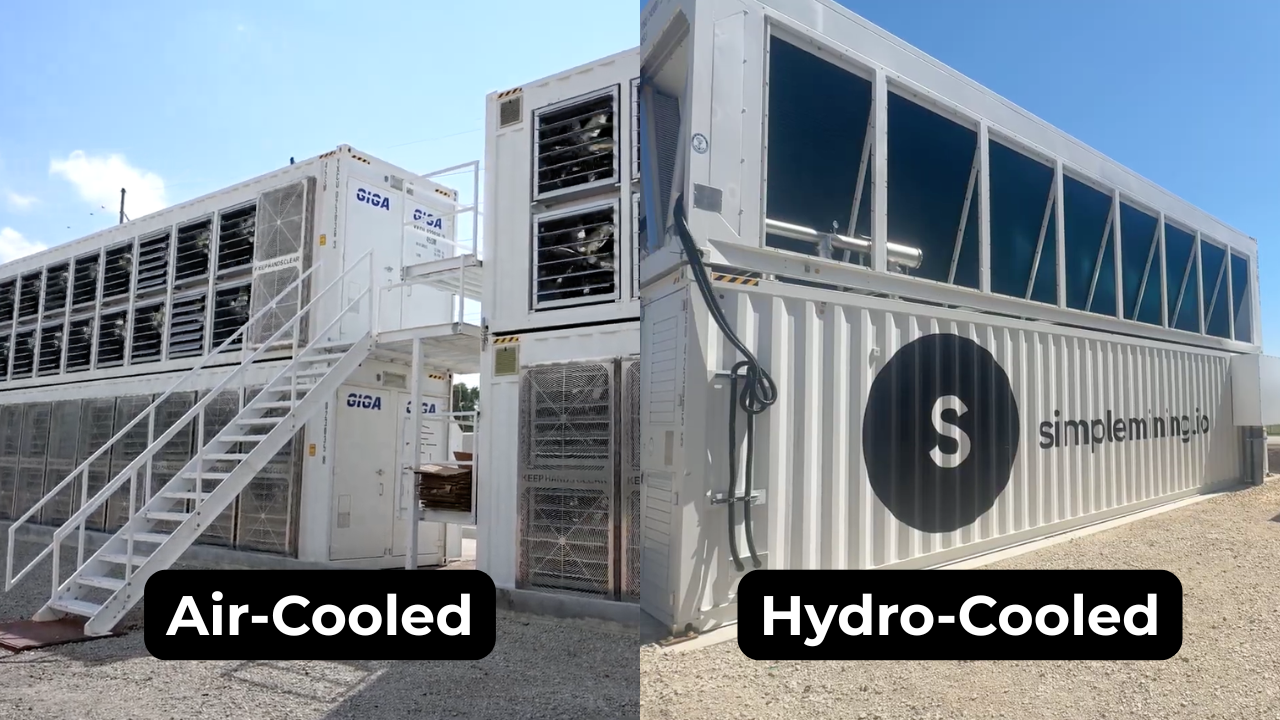
That choice gets locked in at purchase rather than later, since how Bitcoin mining containers are configured sets the price band, the slot count, and whether heat rejection equipment comes with the unit.
GPU Clusters and AI Training Infrastructure
Modern AI training racks exceed what air alone can remove. Densities past 100 kW per rack are now shipping and they require direct-to-chip loops or immersion. Learn what an AI data center is and how it differs from a standard facility. Simple Mining is developing a portfolio of 200-plus megawatts of Tier 3 AI data center infrastructure across the Midwest.
Data Center Cooling Best Practices
Cooling performance comes down to airflow discipline and monitoring and maintenance. The practices below fit a five rack server room and a fifty megawatt hall alike.
Maintain Optimal Temperature and Humidity
Hold server inlet temperatures inside the ASHRAE envelope of 64.4°F to 80.6°F. Watch humidity with the same attention you give temperature. Air that runs too dry invites static discharge and air that runs too wet invites condensation.
Implement Airflow Management
Install blanking panels in every empty rack slot and seal cable cutouts. Bypass airflow wastes cooling capacity before it ever reaches a server. Containment does the heavy lifting here and the earlier section covers it in full.
Monitor Cooling Systems in Real Time
Deploy temperature and humidity sensors at the rack level and alert on trends rather than thresholds. Cooling problems announce themselves as slow drifts before they become failures. A dashboard nobody watches is decoration.
Schedule Preventive Maintenance
Change filters and clean coils and verify refrigerant charge on a fixed calendar. Deferred maintenance is the most common root cause of the cooling failures operators see. The same discipline extends to the hardware itself which is why Simple Mining runs on-site repair operations beside its mining halls.
Deploy Redundant Cooling Infrastructure
Redundancy math starts with N as the capacity needed at full load. N+1 adds one spare unit beyond that requirement and 2N mirrors the entire system. N+1 is the industry standard minimum for cooling because cooling failures cause about 14 percent of serious outages per Uptime Institute's 2025 data. Full 2N duplication suits workloads that cannot tolerate any interruption.
FAQs
What temperature should a data center maintain?
ASHRAE recommends server inlet temperatures between 64.4°F and 80.6°F (18°C to 27°C). High density hardware in ASHRAE's H1 class calls for a tighter band of 64.4°F to 71.6°F. Measure at the server inlet rather than at the room thermostat.
How much does data center cooling cost per kilowatt?
There is no standard price per kilowatt because cooling costs depend on method and climate and local energy rates. Cooling consumes about 30 to 40 percent of total facility energy in a typical data center. That energy share is the most reliable budgeting anchor.
How often should data center cooling systems be serviced?
Schedule preventive maintenance at least once per quarter and monitor conditions around the clock. Filters and coils and refrigerant levels degrade on predictable timelines. Real time alerts catch problems between service visits.
What happens if data center cooling fails?
Servers throttle performance first and then shut down to protect themselves. In a dense facility inlet temperatures can climb past safe limits within minutes. Unplanned downtime follows unless redundant cooling picks up the load.
Can residential HVAC cool a small Bitcoin mining setup?
No. A single ASIC miner produces as much heat as a space heater running at full power around the clock. Dedicated ventilation or professional hosting is the practical path for concentrated mining heat.
Start With Cooling-Ready Infrastructure
Heat is the tax every operator pays and the cooling system sets the rate. The facilities that win are the ones where cooling was designed for the workload rather than adapted to it. Simple Mining built its Iowa infrastructure around high density mining heat from day one with hosting rates of $0.065 to $0.08 per kWh and precision billing that charges only for uptime.
Explore Bitcoin miner hosting and test the infrastructure yourself with a free 7 day trial at 235 TH/s.