

What Is a Cold Wallet? Complete Guide
By Josh Heine, Content Strategist at Simple Mining
Updated August 3, 2026Published August 29, 2024
A cold wallet is a Bitcoin storage method that keeps your private keys offline and away from the internet. It guards the keys that prove you own your coins, so remote attackers cannot reach them. This matters more each year as exchange failures and phishing drain hot wallets that stay online. The trade-off is convenience: a cold wallet adds a few steps before you can move funds. If you hold Bitcoin for the long term, that trade is worth making.
On this page · 11 sections
- What is a Cold Wallet
- How Cold Wallets Work
- Cold Wallet vs Hot Wallet
- Types of Cold Wallets
- Why Use a Cold Wallet
- Disadvantages of Cold Wallets
- Best Cold Wallets for Bitcoin
- How to Set Up a Cold Wallet
- Cold Wallet Security Best Practices
- FAQs About Cold Wallets
- Protect Your Bitcoin With the Right Storage Strategy
Key Takeaways
- A cold wallet stores your Bitcoin private keys offline, out of reach of online attackers.
- The coins live on the blockchain. The wallet holds the keys that prove ownership.
- Hardware wallets are the most common cold storage. Paper, air-gapped devices, and metal backups fill out the field.
- Cold storage signs transactions offline, so your keys never touch an internet-connected device.
- Your seed phrase is the real backup. Protect it offline in more than one place and your Bitcoin survives a lost or broken device.
What is a Cold Wallet
A cold wallet is a Bitcoin wallet that keeps private keys in an offline environment, disconnected from the internet. Your Bitcoin does not live inside the wallet. It lives on the blockchain. The wallet stores the private keys that prove ownership and authorize spending. Keep those keys offline and an attacker on the far side of the world has nothing to grab.
- Private keys: the secret codes that prove you own the Bitcoin and let you spend it.
- Offline storage: physical separation of those keys from any device that touches the internet.
- Cold storage: another name for the same idea, used across the industry.
How Cold Wallets Work
Cold wallets work by generating and holding your private keys on a device that never connects to the internet. A private key is the secret number that controls your Bitcoin, and a seed phrase is the list of words that can rebuild that key on a new device. For the full mechanics of keys and addresses, see our guide to Bitcoin wallets.
Private Keys and Offline Storage
A cold wallet creates your private keys in a sealed offline environment. The keys stay on the device and never get exposed to a browser or an online app. A hot wallet does the opposite: it stores keys on a phone or laptop that lives online. That single difference is why cold storage resists remote theft.
Signing Transactions Without Internet Access
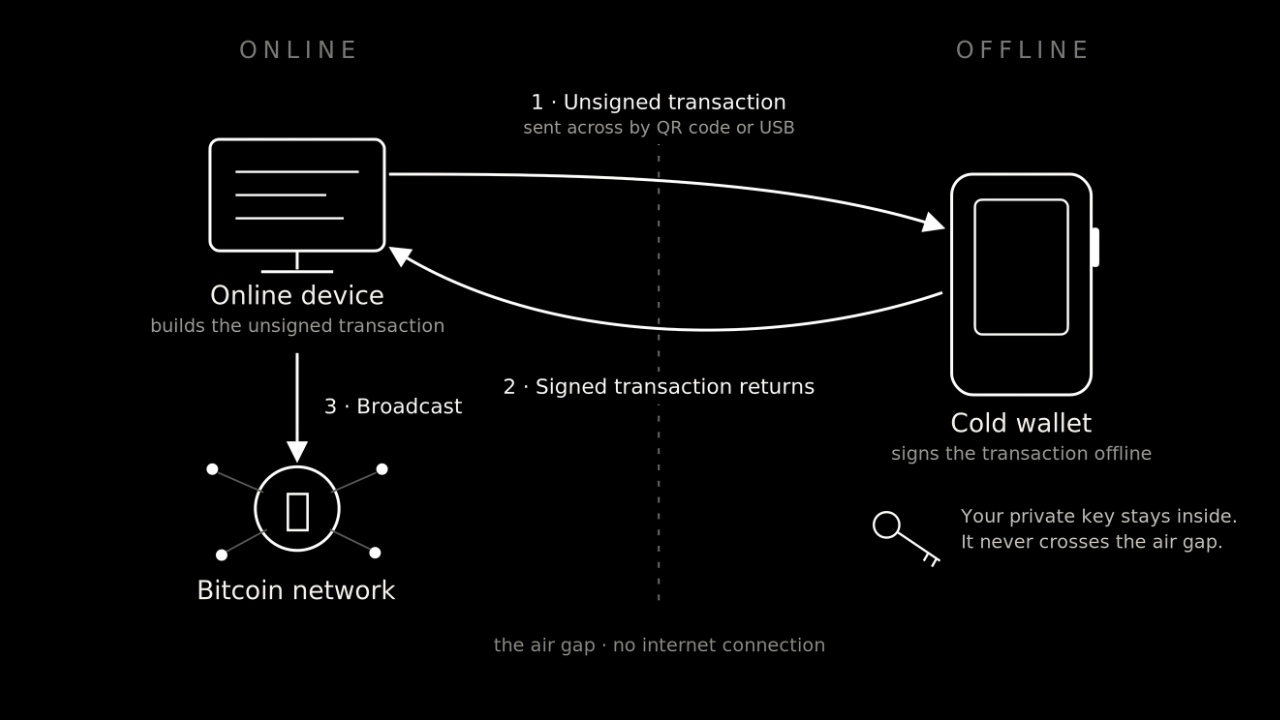
A cold wallet signs a Bitcoin transaction offline, then hands back a signed file for broadcast. You build the unsigned transaction on an online device. You pass it to the cold wallet over USB or by QR code. The cold wallet signs it with the private key held inside. You send the signed transaction back to the online device for broadcast. The key never leaves the device, so it never meets the open internet.
Cold Wallet vs Hot Wallet
A hot wallet stays connected to the internet for fast access. A cold wallet stays offline for security. Hot wallets suit small spending balances and frequent trades. Cold wallets suit long-term holdings you move once in a while.
| Feature | Hot Wallet | Cold Wallet |
|---|---|---|
| Connectivity | Always connected to the internet | Offline, connects only when needed |
| Best for | Frequent trading and daily spending | Long-term holding and large balances |
| Security | Exposed to malware, phishing, and remote hacks | Protected from remote attacks |
| Cost | Often free to download | Requires a hardware purchase |
For a full side-by-side, see our Hot Wallet vs Cold Wallet guide.
Types of Cold Wallets
Cold wallets come in several forms, from purpose-built hardware to engraved metal plates. Each one keeps keys offline in its own way. Hardware wallets lead the field for most holders. The rest serve as backups or niche tools.
Hardware Wallets
Hardware wallets are small physical devices built to hold private keys offline. Most look like a USB stick or a slim card with a screen. The screen lets you verify each transaction on the device itself. Ledger and Trezor are the best-known makers. This is the most common and beginner-friendly form of cold storage.
Paper Wallets
A paper wallet is a private key or seed phrase written or printed on paper. It was an early form of cold storage. Few people use it now because paper is fragile and easy to destroy. Generating one on a compromised computer also leaks the key. Treat paper as a fragile backup at best, not a primary wallet.
Air-Gapped Devices
An air-gapped device never connects to Wi-Fi or Bluetooth and never plugs into a computer. It moves transaction data by QR code or microSD card instead. This removes the wired and wireless paths an attacker could use. Air-gapped signing offers the strongest protection in routine use. The trade-off is more steps for each transaction.
Metal Seed Phrase Backups
A metal backup is a steel or titanium plate engraved with your recovery phrase. It survives fire and water damage that would destroy paper. It does not sign transactions or connect to anything. You pair it with a hardware wallet as a durable copy of the seed.
Why Use a Cold Wallet
People use cold wallets to put their Bitcoin keys out of reach of online attackers and third parties. The benefits all flow from one fact: the keys stay offline. That changes what an attacker can do and who controls your coins.
Protection From Online Threats
Cold storage shuts down remote attacks at the source. Remote attackers need a path to your keys. When the keys sit offline, that path does not exist. An attacker can phish your email and still never touch your Bitcoin.
Full Control of Your Private Keys
A cold wallet puts you in full control of your private keys. This is self-custody: you hold the keys yourself instead of trusting a company to hold them. No third party can then freeze or seize your coins. The Bitcoin principle is blunt: not your keys, not your coins. A cold wallet is how serious holders live by it.
Secure Long-Term Bitcoin Storage
Cold storage fits Bitcoin you plan to hold for years. You set it up once and check on it now and then. There is no daily login and no app sitting online as a target. For a buy-and-hold strategy, that quiet is the point.
Independence From Exchanges and Third Parties
A cold wallet frees your Bitcoin from any single company. Exchanges can freeze withdrawals or fail outright. Coins on an exchange are a promise; coins in cold storage are yours. History keeps proving why that distinction matters.
Disadvantages of Cold Wallets
Cold wallets trade everyday convenience for security, and they cost money upfront. None of these drawbacks outweighs the protection for a long-term holder. Knowing them helps you set up the wallet the right way.
Less Convenient for Frequent Transactions
Moving funds from cold storage takes extra steps. You connect the device and confirm the transaction on its screen. That friction is fine for savings. It rules cold wallets out for day trading.
Risk of Physical Loss or Damage
A cold wallet is a physical object that can be lost or broken. Here is the failure that ends in lost coins: the device dies and the owner never wrote down the seed phrase. The mitigation is simple. Back up the seed phrase offline and your Bitcoin restores onto a new device in minutes.
Learning Curve for New Users
Cold wallets ask new users to learn a few concepts. Seed phrases and on-device signing feel strange at first. The learning curve is short and worth it. Practice with a small amount before you commit savings.
Upfront Hardware Costs
A hardware wallet costs money, while a hot wallet app is free. Most devices run about $80 to $400. Treat that as insurance, not an expense. The device price is tiny next to the Bitcoin it guards.
Best Cold Wallets for Bitcoin
The best cold wallets for Bitcoin keep your keys offline and give you a clear way to verify what you're signing. Open firmware and a clean buying path matter as much as the chip inside. Here are four worth a look.
Ledger
Ledger sells the widest range of hardware wallets. The budget pick is the Nano S Plus at about $79, while the Nano Gen5 near $179 is the newest model and the first touchscreen in the Nano series. The Flex near $249 and the Stax near $399 are the premium touchscreen models. Ledger supports thousands of assets and pairs with a phone or computer. See the range at Ledger.
Trezor
Trezor makes open-source wallets with a long security record. The current Safe line spans the budget Safe 3 up to the post-quantum Safe 7. The older Model T is now retired. Browse the line at Trezor.
Tangem
Tangem is a card-format cold wallet you tap to your phone over NFC, with no screen, battery, or cable to manage. It is seedless by design: the key is generated and locked inside an EAL6+ certified chip, and instead of a written seed phrase your backup is a set of two or three linked cards, each a full copy of the wallet. That removes the seed phrase as something to lose or leak, though it also means the wallet will not restore onto another brand. Audited firmware and a build rated to last decades make it the most beginner-friendly and portable option here. See it at Tangem.
Blockstream Jade
The Blockstream Jade is a budget, Bitcoin-focused wallet from the team behind the Liquid Network. It runs fully open-source, pairs a color screen with a camera for air-gapped QR signing, and keeps a clean buying path. At around $65 it is the most affordable pick here with a strong Bitcoin pedigree. See it at Blockstream.
How to Set Up a Cold Wallet
Setting up a cold wallet takes five steps, from buying the device new to your first test transfer. Work through them in order. Each step protects the one before it. Most hardware wallets follow this seed-phrase setup; a few, like Tangem, are seedless and set up by tapping a card instead.
1. Purchase From an Authorized Retailer
Buy your device new from the maker or an authorized reseller. Skip used units and third-party marketplace listings, which can hide tampering. Check that the packaging and seals arrive intact.
2. Initialize Your Device
Power on the device and follow the on-screen setup. The device walks you through its first configuration. Install firmware only from the official app when prompted.
3. Generate and Secure Your Seed Phrase
Let the device generate your seed phrase, then write it on paper or metal. The seed phrase is the list of words that restores your wallet. Never type it into a phone and never store it in the cloud. This step matters more than any other.
4. Set a Strong PIN or Passphrase
Create a PIN that protects access to the device. Some wallets add an optional passphrase for a second layer. Pick something you can recall without writing it next to the seed.
5. Transfer Bitcoin to Cold Storage
Generate a receiving address on the cold wallet and send a small test amount first. Confirm the test arrives on the blockchain before you move the rest. This habit catches a wrong address before it costs you.
Cold Wallet Security Best Practices
Good cold wallet security comes down to protecting the seed phrase and verifying the device. The device is replaceable. The seed phrase and the firmware are where real risk lives.
Store Seed Phrases Offline in Multiple Locations
Keep your seed phrase offline and split copies across separate places. A home safe and a bank deposit box beat a single drawer. One location can burn or flood; a second copy keeps you safe.
Keep Your Recovery Words Secret
Treat your seed phrase like the key to a vault. No real wallet maker or support agent ever asks for it. Anyone who reads those words can take your Bitcoin.
Verify Firmware Before Updates
Install firmware updates only through the maker's official app. Verify the update is genuine before you approve it on the device. Firmware is also where a maker's own mistakes surface, so follow the vendor's security advisories and apply patches promptly.
Test Recovery Before Large Transfers
Restore your seed phrase onto a spare device before you store serious money. This proves your backup works while the stakes are low. A backup nobody tests is the most common reason coins vanish.
FAQs About Cold Wallets
Can cold wallets be hacked?
Cold wallets resist remote hacking because the private keys never touch the internet. The real risks are physical theft and social engineering that tricks you into revealing your seed phrase. Protect the seed and the device stays hard to beat.
What happens if I lose my cold wallet device?
You do not lose your Bitcoin if you backed up your seed phrase. Restore the seed onto a new device and your funds reappear. The device is replaceable; the seed phrase is what matters.
How much does a cold wallet cost?
Most hardware wallets cost about $80 to $400. Entry models cover the basics, while premium models add touchscreens and air-gapped signing. The price is small next to the Bitcoin a cold wallet protects.
Should I use a cold wallet for small crypto holdings?
Cold wallets make sense for any amount you cannot afford to lose. Many people buy one once their holdings pass a personal threshold. There is no minimum that makes self-custody worthwhile.
Can one cold wallet store multiple cryptocurrencies?
Most hardware wallets hold Bitcoin alongside many other coins. Some devices are Bitcoin-only by design for a smaller attack surface. Pick based on what you hold and how much you value that focus.
How often should I update cold wallet firmware?
Update firmware when the maker ships a security patch or a feature you need. Always confirm the update through the official app before you approve it. There is no fixed schedule; security releases set the pace.
Protect Your Bitcoin With the Right Storage Strategy
Cold storage is where Bitcoin goes to sit still and stay safe. If you buy Bitcoin or mine it, the same rule holds: move it off any platform and into keys you control. Miners earn Bitcoin on a schedule, so a cold wallet gives those rewards a secure home. At Simple Mining we host and repair the machines that produce that Bitcoin, then you send the rewards straight to your own cold storage.
Not your keys, not your coins. Cold storage is how you keep both. Ready to put hashrate behind those rewards? Start with a 7-day free trial or explore hosted Bitcoin mining.