

What is a Bitcoin Wallet? Types, Security & Setup
By Josh Heine, Content Strategist at Simple Mining
Updated June 24, 2026Published June 24, 2024
A Bitcoin wallet is a tool that stores the private keys you use to access and move your Bitcoin. The coins never sit inside the wallet. They live on the Bitcoin blockchain. Your wallet holds the keys that prove ownership and authorize spending. Pick the wrong wallet or lose your keys and you lose access to the Bitcoin itself.
On this page · 13 sections
- What Is a Bitcoin Wallet
- How Bitcoin Wallets Work
- Types of Bitcoin Wallets
- Hot Wallets vs Cold Wallets
- Custodial vs Non-Custodial Wallets
- How to Choose the Right Bitcoin Wallet
- How to Set Up a Bitcoin Wallet
- How to Secure Your Bitcoin Wallet
- How to Recover a Lost Bitcoin Wallet
- Common Bitcoin Wallet Mistakes to Avoid
- How Bitcoin Wallets Connect to Mining
- FAQs
- Put Your Wallet to Work
Key Takeaways
- A Bitcoin wallet stores private keys, not the Bitcoin itself. The coins stay on the blockchain.
- Wallets split into two camps. Hot wallets connect to the internet and cold wallets stay offline.
- Self-custody means you hold your own keys. Not your keys, not your coins.
- Your seed phrase is the master backup. Write it down offline and keep it off any connected device.
- You need a wallet address to receive any Bitcoin, including mining payouts.
What Is a Bitcoin Wallet
A Bitcoin wallet is software or hardware that stores your private keys and lets you send and receive Bitcoin. The wallet does not hold coins. It holds the keys that control coins recorded on the blockchain. Think of the blockchain as the ledger and your wallet as the keyring.
Most beginners miss this one point. Your Bitcoin is never tucked inside an app or a device. It sits in a public ledger that thousands of nodes maintain at once. The wallet is your means of proving the coins are yours and moving them when you choose. Anyone who holds the keys controls the Bitcoin tied to them.
How Bitcoin Wallets Work
A Bitcoin wallet works by generating and storing a key pair plus the address that comes from it. Three pieces do the work. A private key signs. A public key receives. An address is what you share. The relationship runs one direction. A private key produces a public key. A public key produces an address.
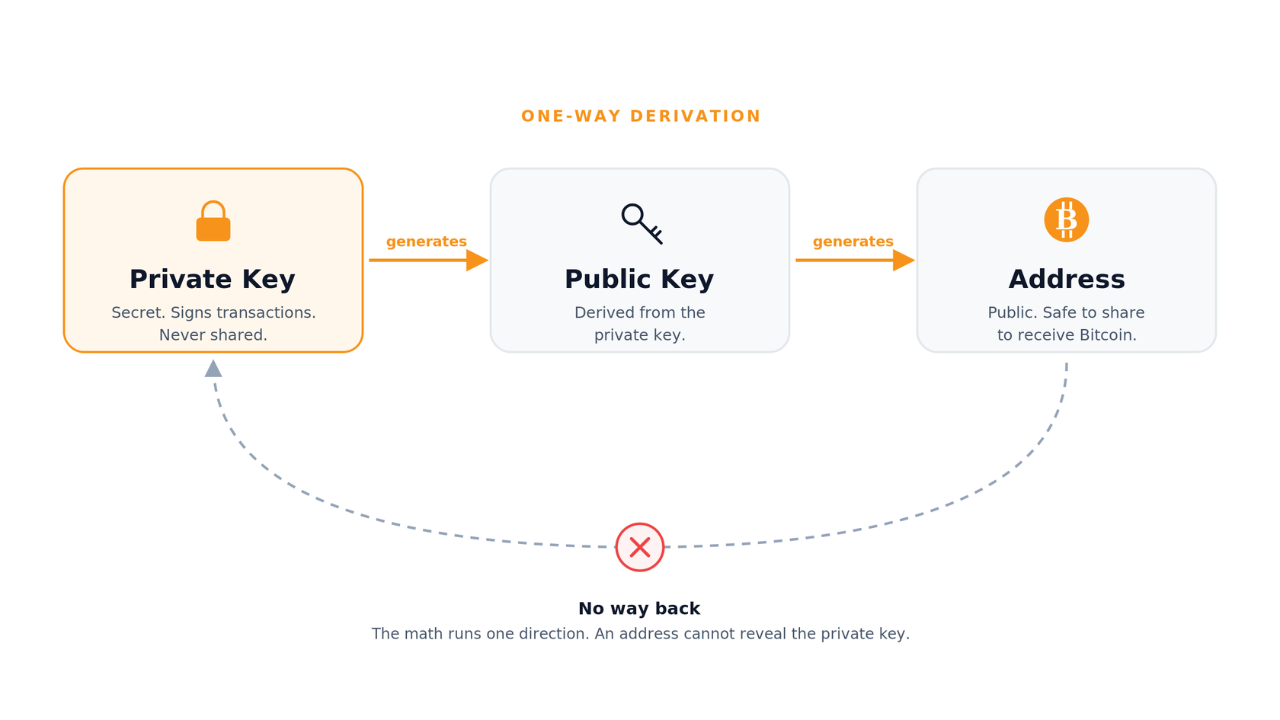
Private Keys
A private key is the secret number that proves ownership and signs transactions. Whoever holds the private key can spend the Bitcoin it controls. You never share it. You never type it into a website. Treat it like the only key to a vault that no one can re-cut. For the technical detail see this private key explainer.
Public Keys and Wallet Addresses
A public key comes from your private key and creates the wallet address you share to receive Bitcoin. The address is safe to hand out. It works like an email address for Bitcoin. People send coins to it and you alone can spend what arrives. The math runs one way, so no one can see your address and work back to your private key. You can read more on how keys and addresses connect.
Seed Phrases and Wallet Recovery
A seed phrase is a list of 12 to 24 words that can restore your entire wallet. Lose the device and the seed phrase rebuilds it on a new one; lose the seed phrase and the Bitcoin is gone for good. Wallets generate these words under the BIP39 standard, and there is a right way to store a seed phrase so it survives fire, theft, and a dead device.
Types of Bitcoin Wallets
Bitcoin wallets fall into six common types that trade convenience against security. The table below maps each type to its strength and best use. The sections after it define each one in a few lines.
| Wallet Type | Security Level | Best For |
|---|---|---|
| Hardware | High | Long-term storage |
| Software | Medium | Regular transactions |
| Mobile | Medium | On-the-go spending |
| Desktop | Medium | Computer-based management |
| Web | Lower | Quick access, small amounts |
| Paper | High if stored well | Offline cold storage |
Hardware Wallets
Hardware wallets are physical devices that keep your private keys offline. They sign transactions inside the device so the keys never touch an internet-connected computer. This makes them the strongest choice for larger holdings. Ledger and Trezor are the best-known models, with Tangem and Blockstream Jade close behind.
Software Wallets
Software wallets are apps that store your keys on a phone or computer. They balance everyday convenience with reasonable security. Most stay connected to the internet, which puts them in the hot wallet camp. The next three types below are all software wallets.
Mobile Wallets
Mobile wallets are smartphone apps built for spending and quick transfers. They scan QR codes and fit daily use. Their security depends on the phone itself.
Desktop Wallets
Desktop wallets install on a laptop or computer. They offer more control and features than a phone app. They tie your keys to one machine so backups matter.
Web Wallets
Web wallets run inside a browser and need no install. They give the fastest access and the weakest control. Keep only small spending amounts here.
Paper Wallets
A paper wallet is a printed copy of a key pair kept offline. It resists hacking because it never goes online. The downside is physical. A fire or a flood can erase it for good. Most users now choose a hardware device instead.
Hot Wallets vs Cold Wallets
Hot wallets connect to the internet for convenience and cold wallets stay offline for security.
- Hot wallets: connected to the internet, fast for frequent transactions, higher exposure to online threats.
- Cold wallets: offline storage, built for long-term holding, strongest protection against remote attacks.
A common pattern keeps spending money in a hot wallet and savings in cold storage. For a full side-by-side see our Hot Wallet vs Cold Wallet guide.
Custodial vs Non-Custodial Wallets
A custodial wallet means a third party holds your keys and a non-custodial wallet means you hold them yourself.
- Custodial wallets: an exchange or service keeps your private keys. Convenient, but you trust them with your coins.
- Non-custodial wallets: you hold and control the keys. Full ownership and full responsibility.
The phrase you hear is simple. Not your keys, not your coins. If a company controls your keys it can freeze or seize your funds. Exchange failures have shown how fast custodial balances can vanish. Read more on Bitcoin custody and why so many holders move to self-custody.
How to Choose the Right Bitcoin Wallet
Choose a Bitcoin wallet by matching the wallet type to how much you hold and how often you transact.
- Storage size: small amounts fit a hot wallet, larger holdings belong in cold storage.
- Transaction frequency: daily spending favors mobile or web, long-term holding favors hardware.
- Technical comfort: beginners want simple apps, advanced users may run a full node.
- Backup support: confirm the wallet gives you a seed phrase you control.
The right answer is often more than one wallet. The hot versus cold decision has its own full framework if you want to weigh that trade-off in depth. The official Bitcoin wallet selector can also walk you through these questions.
How to Set Up a Bitcoin Wallet
Set up a Bitcoin wallet in four steps shown below.
1. Select Your Wallet Type
Match the type to your needs using the criteria above. Most beginners start with a reputable mobile wallet for small amounts.
2. Download or Purchase Your Wallet
Download software wallets only from official sources. Buy hardware wallets straight from the maker to avoid tampered devices. Check the URL and the packaging before you trust either.
3. Create Your Wallet and Secure Your Seed Phrase
Open the wallet and let it generate your seed phrase. Write the words on paper in order. Store the paper offline in a safe place. Never photograph it or save it to the cloud.
4. Fund Your Wallet with Bitcoin
Copy your receiving address from the wallet. Send Bitcoin to it from an exchange or another wallet. Verify the first and last characters of the address before you confirm. Bitcoin transactions cannot be reversed.
How to Secure Your Bitcoin Wallet
Secure your Bitcoin wallet by guarding the seed phrase and verifying every transaction.
Back Up Your Seed Phrase Offline
Write the seed phrase on paper or steel and store copies in separate secure spots. Skip screenshots and cloud notes. A digital copy is a target.
Enable Two-Factor Authentication
Turn on two-factor authentication for any wallet or exchange that supports it. Prefer an authenticator app over text messages.
Use Strong Unique Passwords
Set a long unique password for each wallet and account. A password manager handles the rest.
Verify Transactions Before Confirming
Check the receiving address character by character before you send. Malware can swap an address you copied. There is no undo button on the blockchain.
Keep Wallet Software Updated
Install updates as soon as they ship. Updates patch the security holes attackers look for.
Recognize and Avoid Phishing Attacks
Treat any message asking for your keys or seed phrase as a scam. No real wallet or service ever needs them. Type wallet URLs by hand instead of clicking links. Hot and cold wallets each carry their own habits, so see hot wallet security and cold wallet security for the specifics.
How to Recover a Lost Bitcoin Wallet
Recover a lost Bitcoin wallet by entering your seed phrase into a new compatible wallet.
- Find your seed phrase backup.
- Install the same wallet or a compatible one.
- Choose the restore or recover option.
- Enter the seed words in the correct order.
Without the seed phrase or a private key there is no recovery. No company can reset it for you. This is the cost and the point of self-custody.
Common Bitcoin Wallet Mistakes to Avoid
The most common wallet mistakes all come down to careless key handling.
- Storing the seed phrase as a screenshot or cloud note where hackers can reach it.
- Running wallet transactions over public Wi-Fi.
- Holding large balances in a hot wallet instead of cold storage.
- Skipping wallet updates and leaving known holes open.
- Sharing a private key or seed phrase with anyone who asks.
Treat your keys like a bank PIN that can never be changed.
How Bitcoin Wallets Connect to Mining
Mining pays you in Bitcoin, so you need a wallet address to receive the rewards. A miner or pool sends payouts to the address you set. The Bitcoin lands in a wallet you control. This is why a wallet is the first step before you mine.
With Simple Mining hosting you point your hardware at any pool and set your own payout address. The mined Bitcoin goes straight to your wallet and you keep custody. Even the free 100 TH/s mining trial needs a wallet address to send you the Bitcoin it earns.
The most common setup error we see is a mistyped wallet address. We never hold or touch client keys so a wrong address means lost payouts. We ask clients to confirm the address twice before machines go live.
FAQs
How much does a Bitcoin wallet cost?
Software and web wallets are free to download and use. Hardware wallets cost money and run from entry-level devices to premium models. You pay for the device, not for the wallet itself.
Can I have more than one Bitcoin wallet?
Yes. Many people run more than one wallet. A common split keeps a hot wallet for daily use and a cold wallet for long-term storage.
What is the difference between a Bitcoin wallet and a cryptocurrency exchange?
A wallet stores your private keys and lets you control your Bitcoin yourself. An exchange is a platform where you buy or sell Bitcoin and the exchange often holds custody of your funds. With a wallet you hold the keys.
Do I need a Bitcoin wallet to mine Bitcoin?
Yes. You need a wallet address to receive mining rewards. Pools and hosting services send payouts straight to the address you provide.
Can someone steal Bitcoin from my wallet?
Yes if someone gets your private keys or seed phrase. Anyone who holds those credentials can move your Bitcoin. This is why you keep them offline and never share them.
How long does it take to set up a Bitcoin wallet?
Most software wallets take a few minutes to set up. Hardware wallets take longer because of initial configuration and firmware updates. Either way the backup step matters most.
Put Your Wallet to Work
Owning Bitcoin comes down to one rule: control the keys and you control the coins. Your wallet is the foundation for everything else. When you are ready to turn hashrate into Bitcoin that lands in your own address, Simple Mining helps you buy and host Bitcoin miners that get you there.