

What Is Bitcoin Core? Bitcoin's Full Node Software Explained
By Josh Heine, Content Strategist at Simple Mining
Updated August 17, 2026Published May 7, 2025
Bitcoin Core is the software that most Bitcoin nodes run. It validates every transaction and block against Bitcoin's rules, and it is the closest thing the network has to a reference standard. Anyone who holds, mines, or verifies Bitcoin depends on this program somewhere in the stack. This guide explains what Bitcoin Core does, how to install it with confidence, and how to recover coins from an old wallet file.
On this page · 10 sections
- What Is Bitcoin Core
- What Does Bitcoin Core Do
- Bitcoin Core Features
- How to Download and Verify Bitcoin Core
- Is Bitcoin Core Safe
- How to Recover a Bitcoin Core Wallet
- Bitcoin Core vs. Other Bitcoin Wallets
- Why Full Nodes Matter for Bitcoin Mining
- FAQs About Bitcoin Core
- Verify Your Bitcoin, Let Us Run the Miners
Key Takeaways
- Bitcoin Core is the reference implementation of Bitcoin and the node software most of the network runs. It descends from the original client released in 2009.
- A Bitcoin Core node checks signatures, blocks double spends, and enforces the 21 million coin cap. It rejects anything that breaks those rules no matter who sent it.
- Five maintainers hold commit access as of August 2026: Ava Chow, Michael Ford, Ryan Ofsky, Hennadii Stepanov, and TheCharlatan.
- Bitcoin Core never issues a seed phrase. Recovery works from a wallet file backup or exported descriptors, and the steps differ for old wallet.dat files.
- Download releases only from bitcoincore.org and verify the PGP signatures before installing.
What Is Bitcoin Core
Bitcoin Core is the reference implementation of the Bitcoin protocol and the node software most of the network runs. A reference implementation is the program other software measures itself against: when developers ask what counts as a valid Bitcoin transaction, the answer in practice is whatever Bitcoin Core accepts. The project descends from the client Satoshi Nakamoto released in 2009 and took the name Bitcoin Core with version 0.9.0 in 2014.
The heart of the definition is consensus rules. These are the conditions every valid transaction and block must meet: no more than 21 million coins can ever exist, no coin can be spent twice, and every block must carry valid proof of work. Bitcoin Core encodes those rules and enforces them without exception. Any node running it will reject a payment or a block that breaks them, even one signed by a government or a billion-dollar exchange.
Bitcoin Core is not the only software that runs a Bitcoin node. Bitcoin Knots is the best known alternative, and the differences between Bitcoin Knots and Bitcoin Core come down to default policy settings and the extra options Knots exposes.
What Does Bitcoin Core Do
Bitcoin Core turns an ordinary computer into a Bitcoin full node that validates, stores, and relays the entire blockchain. Install it and your machine becomes a first-class participant in the network with no account and no permission required. The sections below break down what a Bitcoin full node does on the network once Core is running.
Validates Every Transaction and Block
Bitcoin Core checks every transaction and block against the consensus rules before accepting it. In concrete terms it verifies four things: that every signature is valid, that no input has been spent before, that no block creates more coins than the schedule allows, and that each block meets the proof-of-work target. Validation is the reason a node needs no trust in anyone. Your copy of the software does the checking, so nobody can hand you a fake balance.
Stores and Relays the Blockchain
A Core node keeps a complete copy of the blockchain back to the first block in 2009. It serves those historic blocks to new nodes joining the network, and it passes fresh transactions and blocks along to its peers. That relay work is what keeps Bitcoin functioning as a network rather than a product run from one office.
Holds a Wallet
Bitcoin Core includes a built-in wallet that stores private keys on your own machine. You can send, receive, and label coins from the same program that validates them. The wallet is optional, and node operators who keep keys elsewhere can disable it with a single setting.
Connects You to the Peer-to-Peer Network
Bitcoin Core discovers other nodes on its own and maintains around ten outbound connections by default. There is no central server to connect to and none to fail. The software also runs over Tor for operators who want network privacy.
Bitcoin Core Features
Bitcoin Core ships with coin control, fee estimation, replace-by-fee, descriptor wallets, and a full command console. Each one exists to give the person running the node more control than a hosted wallet can offer.
Coin Control and Privacy Tools
Coin control lets you pick the precise coins a payment spends. Your balance is not one number; it is a list of the unspent outputs a coin control picker lets you choose from. Spending the wrong ones together can link two parts of your financial life on a public ledger. Coin control keeps a donation address and a salary address from ever appearing in the same transaction, and labels help you track which coins came from where.
Fee Estimation and Replace-by-Fee
Bitcoin Core estimates fees from its own record of pending transactions instead of asking a third-party service. Those pending transactions sit in the mempool each node keeps in memory, and the node watches how long payments at each fee rate wait for confirmation. Replace-by-fee then covers the miss: the bumpfee command raises the fee on a stuck transaction so it confirms instead of sitting for days.
Descriptor Wallets
Descriptor wallets record where every key comes from, so one backup covers addresses you have not generated yet. That change ended the old pattern of re-backing up a wallet file every hundred addresses. Bitcoin Core 30.0 also dropped support for loading the old legacy wallet format, which matters for recovery and is covered in detail below.
The Console and RPC Interface
Every action in Bitcoin Core is available as a text command. The GUI includes a console window, and the bitcoin-cli tool exposes the same commands for scripts and servers. Commands like getblockchaininfo, bumpfee, and migratewallet appear throughout this guide because the console is where recovery and diagnostics happen.
How to Download and Verify Bitcoin Core
Download Bitcoin Core only from bitcoincore.org and verify the release signatures before you install anything. Fake wallet software is a common theft method, and search ads have carried lookalike download sites for years.
Where to Download It
The official source is bitcoincore.org and the source code lives on GitHub. The current major line is Bitcoin Core 31, and version 31.1 shipped on July 8, 2026. New major versions arrive about every six months. Bitcoin Core 30.0 shipped on October 10, 2025. It retired the old 80-byte default cap on data outputs, a change that drove a lasting dispute over node relay policy and produced the BIP-110 data-limit proposal Core never merged.
Plan for the first start before you run it. A new node downloads and validates the entire chain from 2009 forward, which means hundreds of gigabytes of data and several days on a typical home connection. The prune setting caps stored data at a size you choose while keeping validation complete, and a pruned node checks every rule the same way a full archive does. Hardware choices and node types beyond Core itself are covered in the guide to what a Bitcoin full node does on the network.
Verifying the Signature
Verification takes five minutes and proves two things: the file was not corrupted and it was built by the people who maintain the project.
- Download the release file plus SHA256SUMS and SHA256SUMS.asc from bitcoincore.org.
- Check the hash. Run
sha256sum --check SHA256SUMS --ignore-missingon Linux,shasum -a 256 --check SHA256SUMS --ignore-missingon macOS, orcertutil -hashfile <filename> SHA256on Windows and compare the output by eye. - Import the builder keys from the guix.sigs repository under the bitcoin-core GitHub organization.
- Run
gpg --verify SHA256SUMS.asc SHA256SUMSand confirm several good signatures from known keys.
A matching checksum on its own proves nothing about who built the file. Step 4 is the one people skip, and it is the step that catches a poisoned download site.
Is Bitcoin Core Safe
Bitcoin Core is open source software with a public review process, signed releases, and a track record that runs back to 2009. Anyone can read the code, and every change is debated in the open before it ships.
Who Maintains Bitcoin Core
Five maintainers hold commit access to the Bitcoin Core repository as of August 2026: Ava Chow, Michael Ford, Ryan Ofsky, Hennadii Stepanov, and TheCharlatan. Maintainers merge changes after review and sign releases; hundreds of contributors write and review the code itself. TheCharlatan joined the set in January 2026, and Gloria Zhao stepped down and removed her signing key in February 2026. The full list is auditable in the trusted-keys file inside the repository.
What Developers Can and Cannot Change
Core developers do not set Bitcoin's consensus rules. They implement and maintain code that enforces rules the network already runs on. Node runners hold the final authority here because a node operator can refuse to run any release that changes those rules. A version that altered the 21 million coin cap would be rejected by the nodes and would split away from Bitcoin on its own. What developers can change are defaults, features, and performance, and even those changes face open review before release.
How to Recover a Bitcoin Core Wallet
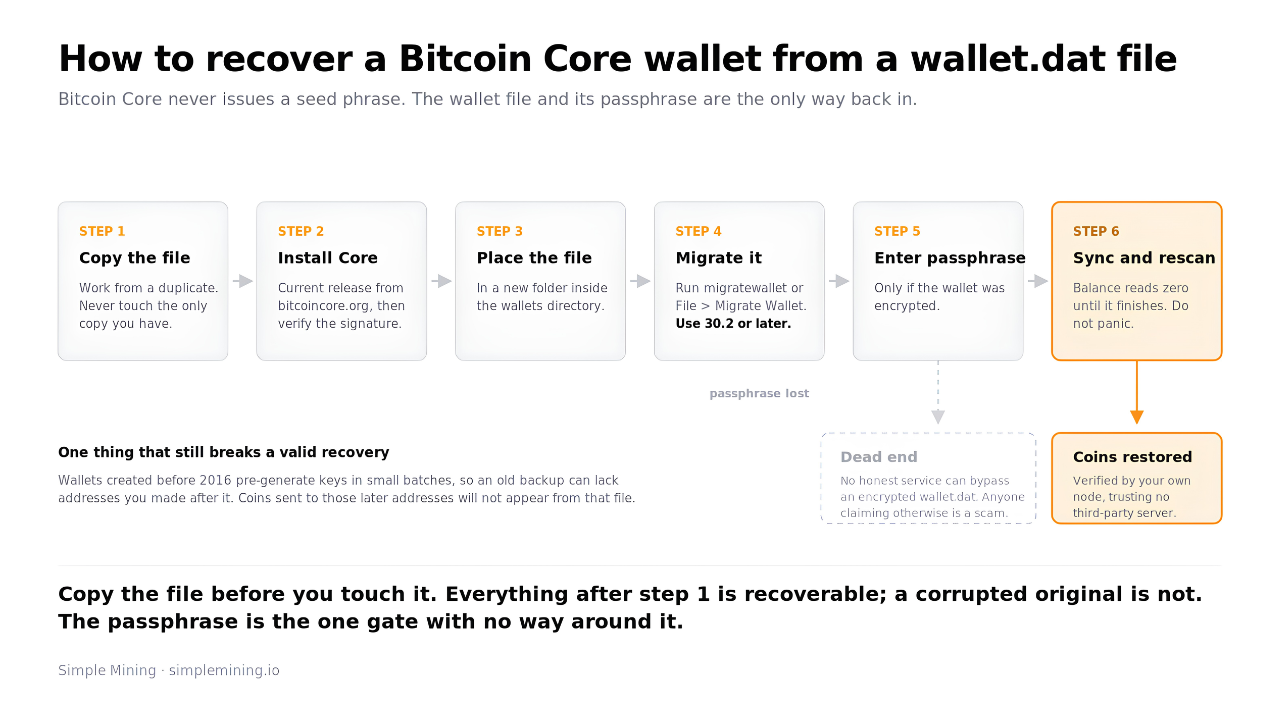
You recover a Bitcoin Core wallet from a wallet file backup or exported descriptors, not from a seed phrase. Bitcoin Core has never issued 12 or 24 recovery words, and people lose real time hunting for a phrase that never existed. The file you need is either a wallet.dat from an older installation or a backup made through the program itself.
Recovering from wallet.dat
The wallet.dat file is the database that holds your private keys. Find it in the data directory: %APPDATA%\Bitcoin\wallets on Windows, ~/Library/Application Support/Bitcoin/wallets on macOS, and ~/.bitcoin/wallets on Linux. Installations from before 2019 often kept a single wallet.dat in the data directory root instead.
Work through recovery in this order:
- Copy the file first. Never work on the only copy you have, and never open it from a failing drive.
- Install the current Bitcoin Core release from bitcoincore.org and verify it as described above.
- Make a new folder inside the wallets directory and place the copied wallet.dat inside it.
- Convert the wallet. Legacy wallets no longer load in Bitcoin Core 30.0 and later, so run
migratewalletfrom the console or use File > Migrate Wallet in the GUI. Use 30.2 or later: a bug in 30.0 and 30.1 could delete wallet files during migration on a pruned node. Migration turns the old file into a descriptor wallet. - Enter the passphrase if the wallet was encrypted. There is no path around a lost passphrase.
- Let the node sync and rescan in full. The balance reads as zero or incomplete until the rescan finishes, so do not panic at an empty screen.
Two things break recoveries most often. Wallets created before 2016 pre-generate keys in small batches, so an old backup can lack addresses you created after making it; coins sent to those later addresses will not show up from that file. And an encrypted wallet.dat without its passphrase is unrecoverable by any honest service, so treat anyone promising otherwise as a scam.
Descriptor Backup and Recovery
Modern Bitcoin Core wallets back up in one step and restore in one step. Use the backup option in the file menu or the backupwallet command to write a backup file, and use the restore option or restorewallet to bring it back on any machine. Because descriptors are deterministic, one backup covers every address the wallet will ever generate.
You can also export the descriptors themselves. The listdescriptors command with private data enabled prints text you can store offline on paper or metal, and importing that text into a fresh wallet rebuilds everything. Most other wallets hand you the recovery seed phrase that rebuilds every key. Bitcoin Core does not, so the wallet file or the exported descriptors are the backup. Guard them like the coins themselves.
Bitcoin Core vs. Other Bitcoin Wallets
Bitcoin Core verifies every rule itself while most other wallets trust a server to do it for them. That is the real dividing line, and it matters more than any feature list.
| Setup | Who validates | Where keys live | Backup form |
|---|---|---|---|
| Bitcoin Core | Your own node | Your computer | Wallet file or descriptors |
| Light wallet (Electrum and similar) | Someone else's server | Your device | Seed phrase |
| Hardware signer + your own node | Your own node | Offline device | Seed phrase |
A light client like Electrum asks servers for your balance and history. It starts in seconds and works well on a laptop, but you accept the server's view of the chain as true. The strongest setup pairs the two models: keep keys on a hardware signer and connect it to your own Bitcoin Core node, so nothing about your holdings touches a third-party server and validation stays yours.
Why Full Nodes Matter for Bitcoin Mining
Every Bitcoin block starts as a template built from a node's view of pending transactions. Miners do not need to run that node themselves, because pools and hosting providers run node infrastructure on their behalf.
When you point a machine at the mining pool that builds your block templates, the pool's nodes decide which transactions your hashrate confirms. If you want that choice back, building your own block templates with DATUM puts it in your hands.
One of the first questions new hosting clients ask us is whether they need to run Bitcoin Core to mine. The answer is no. The pool handles it, and your machine only needs power, cooling, and a network connection.
FAQs About Bitcoin Core
Is Bitcoin Core legit?
Yes. Bitcoin Core is the open source reference implementation of Bitcoin and descends from the original client released in 2009. Its code is public on GitHub and its releases carry signatures from known maintainers. Download it only from bitcoincore.org and verify the signature before installing.
How big is the Bitcoin Core?
The program itself is a small download. The blockchain it validates is the heavy part at several hundred gigabytes and growing. The prune setting caps stored data at a few gigabytes while validation stays complete.
Who maintains Bitcoin Core?
Five maintainers hold commit access as of August 2026: Ava Chow, Michael Ford, Ryan Ofsky, Hennadii Stepanov, and TheCharlatan. Hundreds of contributors write and review the code, and every change is debated in public before it merges.
Is Bitcoin Core a wallet?
Bitcoin Core includes a wallet, but it is more than one. The program is a full node that validates the entire blockchain, and the wallet is one feature inside it. You can run the node without the wallet or use the wallet backed by your own validation.
What is the difference between Bitcoin Core and a Bitcoin wallet app?
A wallet app holds keys and trusts a server for everything else. Bitcoin Core holds keys and verifies the blockchain itself, so no server can lie to it about a balance or a payment. The trade-off is disk space and sync time, and the reward is trusting no one.
How do I recover a wallet.dat file?
Copy the file, install the current Bitcoin Core release, and place the copy in a new folder inside the wallets directory. Run the migratewallet command to convert it, since legacy wallets no longer load in version 30.0 and later. Enter the passphrase if it was encrypted, then let the node rescan before judging the balance.
What version of Bitcoin Core should I run?
Run the newest release from bitcoincore.org. The current line is Bitcoin Core 31, and version 31.1 shipped on July 8, 2026. New major versions arrive about every six months, and older lines stop receiving security updates once they reach end of life.
Verify Your Bitcoin, Let Us Run the Miners
Running Bitcoin Core is the cheapest form of sovereignty in Bitcoin: one computer and some patience buys you full verification. Running miners is a different job, and it takes industrial power, cooling, and repair benches. Simple Mining hosts client machines across 150+ MW of Iowa facilities with 95% average uptime and precision billing. If you want mining exposure without building the infrastructure, Bitcoin miner hosting in Iowa covers deployment, monitoring, and free repair labor while the hardware stays yours. Schedule a call and bring your questions; we answer the node ones too.